> ## Documentation Index
> Fetch the complete documentation index at: https://docs.taag.cc/llms.txt
> Use this file to discover all available pages before exploring further.
# Webhooks
Since webhooks are the ultimate source of truth, it's crucial to set up a webhook endpoint, go to your project settings, click on 'Webhook & Redirect'. You'll find the Webhook URL and Secret Hash fields needed for Taag to communicate with your application.
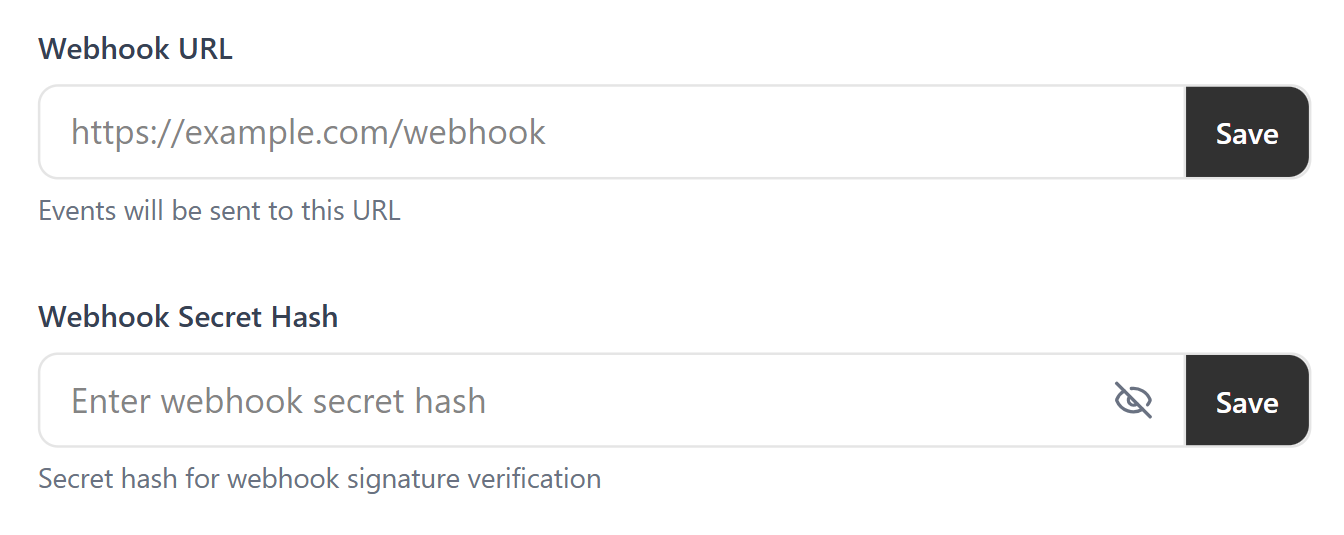 Just enter your webhook URL here, this is where Taag will send data. The secret hash is used to verify that the data really came from Taag.
Keep your **secret hash** safe and never share it with anyone
***
## Request Header
The request sent to the webhook URL will have the following header
**key:** `taag-signature`, **value:** `t=, s=`
## Events
The webhook payload depends on which event that occured, here are all events listed:
Whenever there is a new subscriber this payload will be sent to the webhook:
```json theme={null}
{
"event": "subscriber.new",
"data": {
"email": "stevejobs@apple.com",
"firstName": "Steve",
"lastName": "Jobs",
"subscriberId": "f3a5e5afda82acd2569415e869193d9d",
"status": "ACTIVE",
"countryCode": "US",
"createdAt": "2025-08-26T18:45:40.567Z"
}
}
```
Whenever a subscriber is unsubscribed this payload will be sent to the webhook:
```json theme={null}
{
"event":"subscriber.unsubscribed",
"data": {
"email":"stevejobs@gmail.com",
"firstName":"Steve",
"lastName":"Jobs",
"subscriberId":"f3a5e5afda82acd2569415e869193d9d",
"status":"UNSUBSCRIBED",
"countryCode":"US",
"unsubscribedAt":"2025-09-11T15:36:14.850Z"
}
}
```
## Signature
```
= HMAC_SHA256(, )
```
where:
* **HMAC\_SHA256** is a function to compute an HMAC with the SHA256 hash function.
* `` is the secret hash you set in your project webhook URL settings.
* `` is the concatenation of the timestamp, the character "#" and the request body.
## Example
```
taag-signature: t=1653405045000,s=bfecb20753326e5e8602f4a6e727bcd22b7cb1d00797fe5bd65db8cfaf2f4903
```
## Verifying the Signature
You can follow the steps below to verify a signature:
**Step 1:** Extract the timestamp and signature from the header `taag-signature`. Split the header using the `,` character as the separator, to get a list of elements. Then split each element, using the `=` character as the separator, to get a prefix and value pair. The value for the prefix `t` corresponds to the timestamp, and `s` corresponds to the signature.
**Step 2:** Prepare the `signed_payload` string. The `signed_payload` string is created by concatenating: The timestamp (as a string), the character `#` and the **Stringified JSON payload** (the request body).
**Step 3:** Determine the expected signature. Compute a **HMAC** with the **SHA256** hash function. Use the secret hash as the key and use the `signed_payload` string as the message.
**Step 4:** Compare the signature in the header to the expected signature. If they match that means it is valid from Taag.
If you get stuck anywhere, please reach out to this email: `elitecarlson@gmail.com`
Just enter your webhook URL here, this is where Taag will send data. The secret hash is used to verify that the data really came from Taag.
Keep your **secret hash** safe and never share it with anyone
***
## Request Header
The request sent to the webhook URL will have the following header
**key:** `taag-signature`, **value:** `t=, s=`
## Events
The webhook payload depends on which event that occured, here are all events listed:
Whenever there is a new subscriber this payload will be sent to the webhook:
```json theme={null}
{
"event": "subscriber.new",
"data": {
"email": "stevejobs@apple.com",
"firstName": "Steve",
"lastName": "Jobs",
"subscriberId": "f3a5e5afda82acd2569415e869193d9d",
"status": "ACTIVE",
"countryCode": "US",
"createdAt": "2025-08-26T18:45:40.567Z"
}
}
```
Whenever a subscriber is unsubscribed this payload will be sent to the webhook:
```json theme={null}
{
"event":"subscriber.unsubscribed",
"data": {
"email":"stevejobs@gmail.com",
"firstName":"Steve",
"lastName":"Jobs",
"subscriberId":"f3a5e5afda82acd2569415e869193d9d",
"status":"UNSUBSCRIBED",
"countryCode":"US",
"unsubscribedAt":"2025-09-11T15:36:14.850Z"
}
}
```
## Signature
```
= HMAC_SHA256(, )
```
where:
* **HMAC\_SHA256** is a function to compute an HMAC with the SHA256 hash function.
* `` is the secret hash you set in your project webhook URL settings.
* `` is the concatenation of the timestamp, the character "#" and the request body.
## Example
```
taag-signature: t=1653405045000,s=bfecb20753326e5e8602f4a6e727bcd22b7cb1d00797fe5bd65db8cfaf2f4903
```
## Verifying the Signature
You can follow the steps below to verify a signature:
**Step 1:** Extract the timestamp and signature from the header `taag-signature`. Split the header using the `,` character as the separator, to get a list of elements. Then split each element, using the `=` character as the separator, to get a prefix and value pair. The value for the prefix `t` corresponds to the timestamp, and `s` corresponds to the signature.
**Step 2:** Prepare the `signed_payload` string. The `signed_payload` string is created by concatenating: The timestamp (as a string), the character `#` and the **Stringified JSON payload** (the request body).
**Step 3:** Determine the expected signature. Compute a **HMAC** with the **SHA256** hash function. Use the secret hash as the key and use the `signed_payload` string as the message.
**Step 4:** Compare the signature in the header to the expected signature. If they match that means it is valid from Taag.
If you get stuck anywhere, please reach out to this email: `elitecarlson@gmail.com`